TL;DR — What is GoHighLevel?
GoHighLevel (aka HighLevel/GHL) is an all-in-one CRM, funnel/page builder, email/SMS/phone, and automation platform built to replace a patchwork of tools. I use it to capture leads, automate follow-ups, book appointments, and track revenue—without having to piece together multiple apps.
If you’re an agency, coach, consultant, creator, or local business, it centralizes your marketing, sales, and client delivery. Standard access starts with a 14-day free trial (official promos sometimes extend).
My simple start: build a funnel/page, connect email/phone, import a snapshot, turn on workflows, and go live.
What is GoHighLevel?
GoHighLevel (aka HighLevel/GHL) is an all-in-one platform that replaces the typical stack of CRM, funnel/page builder, email/SMS/phone tools, booking apps, review software, and basic course/membership hosting—under one login.

In simple terms: GoHighLevel is your customer database, website/funnel builder, and automation brain that captures leads, follows up automatically, books appointments, collects payments, and tracks revenue.
Core modules include: Conversations (omnichannel inbox), Pipelines/CRM, Workflows (automation), Funnels & Websites, Calendars, Forms/Surveys/Chat, Reputation (reviews), Courses/Memberships, Payments & Invoicing(Stripe), Social Planner, Reporting/Attribution, plus a LeadConnector mobile app. Agencies can also white-label the platform and sell it as their own software with SaaS Mode.
Best fit: agencies, coaches/consultants, creators, and local service businesses that want systems—not a duct-taped tool stack. Standard access begins with a 14-day free trial (extended 30-day trial available via official promos).
If that’s the 30‑second view, here’s who gets the most out of HighLevel—and why.
Who Is GoHighLevel For? (and what you’ll achieve)
Agencies & freelance marketers
Build recurring revenue with SaaS Mode and packaged snapshots, rather than one-off projects. Unify client comms in one inbox, reduce churn with reporting and reviews. Start with: SaaS Mode, Sub‑accounts, Workflows, Pipelines, Reputation, LC Email/Phone, Payments.
Local service businesses (HVAC, dental, real estate, home services)
Drive more booked jobs and reviews; rescue leads with Missed Call Text Back. Start with: LC Phone, Calendars, Reputation, Forms/Chat Widget, Workflows.
Coaches, consultants & course creators
Capture leads, auto‑nurture, book calls, onboard clients, and deliver gated programs. Start with: Funnels & Websites, Calendars, Workflows, Courses/Memberships, Payments, Email/SMS.
Multi‑location & franchises
Roll out a standard, proven stack to every new location with snapshots, keep brand controls, and compare performance. Start with: Snapshots, Sub‑accounts, Reporting/Attribution, Reputation.
B2B services & boutique agencies
Track pipeline health, route leads, and automate follow‑ups from first touch to closed‑won. Start with: Pipelines/CRM, Workflows, Calendars, Email/SMS, Reporting.
Creators & affiliates
Spin up funnel pages, lead magnets, and promos quickly; automate sequences and track sales. Start with: Funnels & Websites, Email/SMS, Social Planner, Workflows.
Not a fit? If you only need a simple newsletter tool or your team won’t adopt a CRM, a lighter tool may be cheaper. HighLevel shines when you want one system for capture nurture → book → fulfill → retain.
If you want a head start, my GoHighLevel bonus pack includes premium softwares, templates and support.
How HighLevel Works (in 5 steps)

My Goal for you: Get from zero to capturing leads, firing follow-ups, tracking bookings/payments, without duct-taping tools.
What you’ll need: Your domain DNS login, a sending email/domain, a credit/debit card for trial verification, and (optional) a Stripe account.
1) Create your account & your first sub‑account (5–10 mins)
- Start the trial and choose your plan. Follow this signup tutorial.
- In the Agency view, create a Sub‑Account (for yourself or your first client). Name it, set the time zone, and the currency.
- Connect your primary business email for notifications.
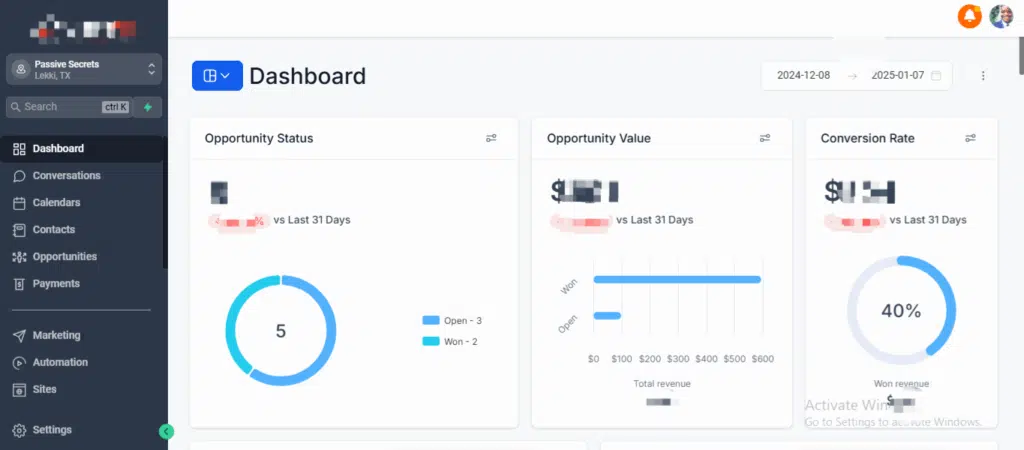
- Quick test: Log into the sub‑account and click around the Dashboard and Conversations tabs so you’re oriented.
Pro tip: If you serve multiple niches, create one “Master” sub‑account to prototype, then snapshot it later.
2) Connect sending & calling: LC Email + LC Phone (20–45 mins)
- Email: add your domain and authenticate (SPF, DKIM, DMARC). Use a dedicated sending domain/subdomain (e.g., mail.yourbrand.com). Send a 1–3 email warm‑up campaign to yourself/teammates first.
- Phone/SMS: purchase a number in LC Phone and enable Missed Call Text Back. Set business hours and voicemail.
- Compliance: if you send SMS to U.S. numbers, complete A2P 10DLC registration inside the Phone settings.
What to avoid: launching big campaigns before DNS records fully propagate—deliverability will tank.
3) Import a snapshot or use templates (20–60 mins)
- Pick an industry‑fit Snapshot (funnels, workflows, calendars, pipelines bundled). Import to your sub‑account.
- Or, start from Funnels & Websites templates and a blank Workflow. Keep page sections lean: headline → proof → offer → form/booking.

- Connect Payments (Stripe) if you’ll sell calls, deposits, or programs. Create Products (one‑time/subscription) and test a $1 sandbox checkout.
4) Wire up workflows & your pipeline (30–90 mins)
- Inbound lead workflow: Trigger = Form/Survey/Chat → create/update contact → add to Pipeline (New Lead) → immediate SMS/email → internal task → wait → follow‑up (2–3 touches) → auto‑move stage when booked.
- Booking workflow: Trigger = Appointment Created → confirmation email/SMS → 24h + 2h reminders → post‑call survey → “no‑show” recovery if missed.
- Reputation workflow: Trigger = Won/Job Completed → 1–3 review requests with smart delays; route negatives to support.
- (Agencies) If on SaaS Mode, set Plans (tiers, usage), Rebilling, and an onboarding workflow that creates assets for new clients automatically.
What to avoid: dozen‑step workflows on day one. Start with 1–2 workflows that touch every lead within 5 minutes.
5) Launch, test, and measure (15–45 mins)
- Publish your funnel/website on a custom domain.
- Track: add your analytics/pixel and turn on Attribution Reporting.
- End‑to‑end test: submit a form → confirm the contact appears in Conversations/CRM → ensure the workflow sends the first message → book a test appointment → complete a test checkout if selling.
- Iterate weekly: check Pipeline conversion, reply rates, show rate, and cost per lead (if running ads). Adjust copy/cadence before adding more complexity.
Next up: let’s zoom into the Core Features so you know which modules to switch on first and which to ignore for now.
GoHighLevel Features
Conversations & CRM
A unified inbox for SMS, email, calls, web chat, FB/IG DMs, and Google messages. Every reply threads to the contact record and pipeline, so follow‑ups never fall through the cracks.
Opportunities (Pipelines, Deals & Tasks)
Drag-and-drop stages (New Lead → Qualified → Booked → Won/Lost) with tasks and notes. Move cards automatically when forms are submitted, appointments are booked, or purchases are made.
Funnels & Websites
Drag‑and‑drop pages, A/B testing, popups, sticky bars, and custom domains/SSL. Fine for most use cases; you can still point to an external site if needed. Want to compare page builders head-to-head? Here’s our best funnel builders comparison.
Automations/Workflows
If/then automations trigger on forms, tags, pipeline moves, purchases, page visits, or appointments. Add delays, goals, branching, internal tasks, multi-channel steps, and webhooks.
Calendars & Appointments
Round‑robin and team calendars, buffers, time-zone handling, auto‑create deals/tasks, and reminders to cut no‑shows.
Forms/Surveys/Chat Widget
Embed forms/surveys anywhere; add a chat widget that texts back when missed. Feed all submissions to Conversations and your pipeline.
Email (LC Email)
Native sending with domain authentication (SPF/DKIM/DMARC), templates, broadcasts/campaigns, and simple segmentation. Warm up gradually and monitor opens/replies for deliverability.
SMS & Phone (LC Phone)
Purchase/port numbers, make/receive calls, call recording, voicemail drops, and automate texts (including Missed Call Text Back). For the U.S., complete A2P 10DLC registration for compliant messaging.
Reputation Management
Automate review requests by email/SMS with smart timing and negative‑feedback routing. Widgets let you showcase ratings on your pages.
Courses/Memberships
Host lessons, bundles, and simple programs with gated access. Works well for coaching deliverables, lead magnets, and drip schedules.
Payments & Invoicing
Connect Stripe, sell one-time, subscriptions, or invoices, and track MRR per contact. Useful for deposits, paid calls, and productized services.
Social Planner
Schedule posts across channels, monitor engagement, and track performance from one place. Helps to keep promos and content cadence in one place.
Reporting & Source Attribution
Source/medium tracking, funnel stats, call reporting, and reply rates. Find the steps that leak and fix them before scaling ad spend.
Mobile App (LeadConnector)
Embed forms/surveys anywhere; add a chat widget that texts back when missed. Feed all submissions to Conversations and your pipeline.
WordPress Integration (LeadConnector plugin)
Embed forms, calendars, chat widget, and dynamic content into WordPress with native tracking and consistent styling.
What’s New in 2024–2025
- AI Agents / “AI Employee”: Pre‑built agents you can train to answer, route, book, or follow up—via chat, email, or voice. Package them into snapshots for client onboarding.
- LC Email/LC Phone maturation: clearer pricing & rebilling rules.
- WordPress plugin improvements for embedding & tracking.
- Platform updates & policy refresh (note recency).
Plans & Real-World Pricing (With Hidden Costs)
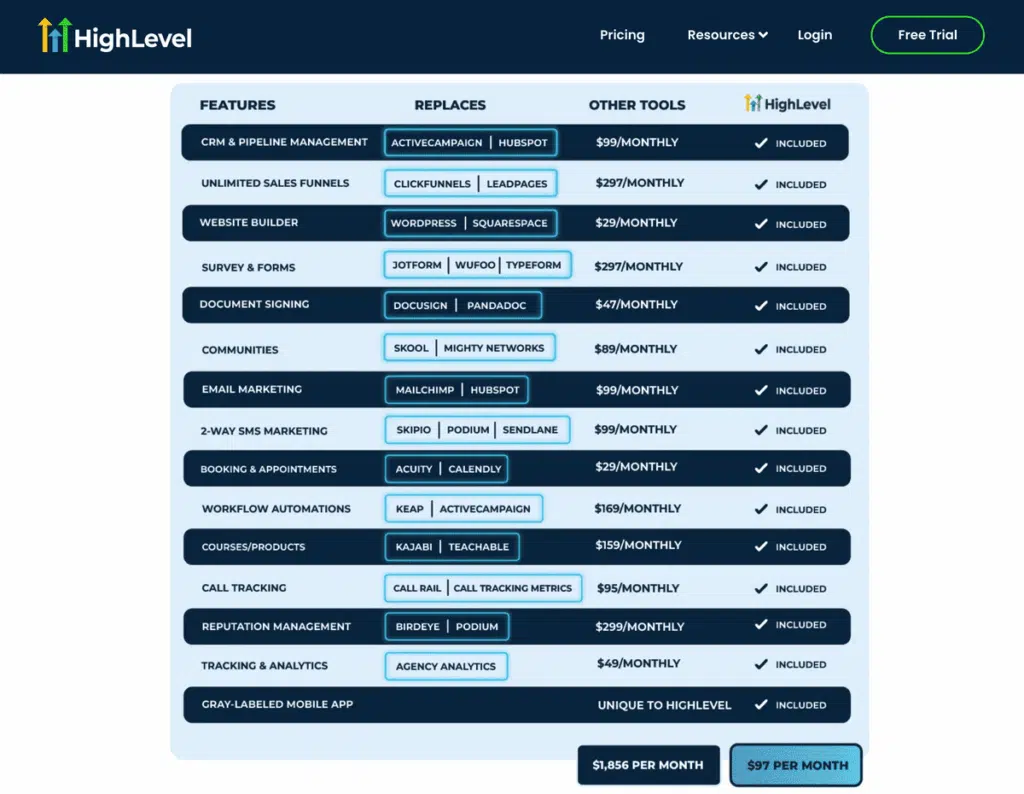
Starter ($97/month)
For a single brand. Core CRM, Conversations, Funnels/Websites, Email/SMS/Phone (LC), Calendars, Forms/Surveys/Chat, Reputation, Courses/Memberships, Social Planner, Reporting/Attribution. No SaaS Mode.
Unlimited ($297/month)
For agencies handling multiple clients. Everything in Starter plus unlimited client Sub‑Accounts, account Snapshots, API access, branding options, and workflow/template reuse at scale. (White‑label mobile app is an add‑on.)
SaaS Pro ($497/month)
Everything in Unlimited plus SaaS Mode: sell HighLevel as your own software. Includes automated account provisioning, plan configurator, usage rebilling (LC Email/Phone), and upgrade/downgrade automations.

Usage add-ons: LC Email per-1k rate, LC Phone call/SMS rates, numbers, carrier fees; when rebilling is allowed without/with markup. See full GoHighLevel pricing details.
Usage & compliance (the “hidden” costs to plan for)
- LC Email: pay‑as‑you‑send model (priced per 1,000 emails). Use a dedicated, authenticated domain and warm up gradually for optimal deliverability.
- LC Phone: pay per minute/SMS; numbers have a small monthly fee. (US) complete A2P 10DLC registration; carrier fees apply.
- Numbers & recording: Buying or porting numbers and storing recorded calls incur small ongoing costs.
- Payments (Stripe): standard Stripe processing fees apply to paid checkouts/subscriptions.
- Add‑ons: optional white‑label mobile app; optional AI Agents/“AI Employee” usage.
SaaS Mode & White‑Label (recurring revenue for agencies)
What it does: Package HighLevel as your own software, auto‑provision client accounts, set plan limits/features, and rebill LC Email/Phone usage with your markup. You keep your brand front‑and‑center—including custom domains and (optional) white‑label mobile app.
How to package: Create 2–3 plans (Starter/Growth/Pro) mapped to features (calendars, seats, workflows, AI Agents) and soft usage caps. Bundle a niche Snapshot so each new customer gets funnels, workflows, calendars, and a pipeline the moment they log in. For alternatives with different pricing/feature gates, check our best white-label funnel builder roundup.
Onboarding flow: checkout → welcome email → auto‑provision sub‑account → onboarding checklist (verify domain, connect LC Email/Phone, import contacts) → first‑week success workflow (publish page, turn on reminders). Add an in‑app upsell to unlock premium features.
Rebilling & margins: pass through LC Email/Phone and number costs with a sensible markup; price plans for outcomes (bookings/leads), not just features. Keep support light with Loom‑based SOPs and an in‑app help center.
When not to use: If you only serve a handful of bespoke clients that require heavy custom builds, you may prefer Unlimited/Agency without SaaS Mode. You can also earn by promoting GoHighLevel (affiliate program).
Snapshots & Templates (Launch Faster)
A GoHighLevel snapshot is a packaged bundle of assets—funnels/pages, workflows, calendars, pipelines, forms/surveys, tags, email/SMS templates, products, and settings—so a new sub‑account can be production‑ready in minutes.
When to use Snapshots vs Templates:
- Use a Snapshot when you want a proven, repeatable setup for a niche (e.g., dental, coaching, home services) or when you’re selling software plans in SaaS Mode.
- Use Templates (single funnels/pages or one‑off workflows) for quick tests or add‑ons to an existing build.
Where to get them:
- Build your own in a “Master” sub‑account and export.
- App/marketplace snapshots and reputable vendors (then customize heavily for your offer/region).
GoHighLevel vs Alternatives (which one should you pick?)
| Tool | Best For | Core Strengths | Where It Lags vs HighLevel |
| GoHighLevel (HighLevel/GHL) | Agencies, coaches/consultants, local services, B2B | All‑in‑one: CRM, funnels/pages, automations, email/SMS/phone, calendars, reviews, courses, reporting; SaaS Mode for white‑label software | Learning curve; usage setup (email auth, A2P); not an enterprise CRM |
| ClickFunnels | Direct‑response funnels & quick landing pages | Page/funnel builder UX, templates, split‑testing | Limited native CRM/automations; no built‑in phone/SMS; no true multi‑client SaaS Mode |
| Kartra | Solo creators/course sellers | Pages, email, carts, basic memberships in one UI | Pages, email, carts, and basic memberships in one UI |
| ActiveCampaign | Email automation + light CRM | Powerful email automation, deliverability focus | No native funnels, phone, reviews, or SaaS Mode; add-ons needed |
| Keap (Infusionsoft) | SMBs needing CRM + invoicing | CRM, quotes/invoices, sales automation | Landing pages/funnels are less robust; limited native phone/SMS |
| HubSpot | Scale‑up/enterprise marketing & sales | Enterprise CRM, integrations, reporting | Expensive as you scale; funnels/pages, phone/SMS require add‑ons |
| Zoho CRM + Zoho One | Cost‑sensitive teams needing broad apps | Wide app suite, CRM flexibility | Marketing funnels, reviews, and phone/SMS orchestration are not as turnkey |
| Mailchimp (+pages) | Newsletters & simple lead gen | Email/newsletters, basic landing pages | No full CRM/automations stack; no native phone/SMS, reviews, or SaaS |
How to choose (rule‑of‑thumb)
- Pick GoHighLevel if you want one system to capture → nurture → book → fulfill, or if you’re an agency that wants recurring revenue via SaaS Mode.
- Pick a funnel tool (ClickFunnels/Kartra) if you only need pages and a cart for a single brand and you’re happy stitching other parts together.
- Pick an email‑centric tool (ActiveCampaign/Mailchimp) if email is 95% of your motion and you don’t need native phone, reviews, or deep funnels.
- Pick a CRM‑first tool (HubSpot/Zoho/Keap) if you require robust CRM objects, quoting, or complex sales day-to-day operations—and you’re fine adding separate funnel/phone/review tools.
Setup Checklist (go live in ~90 minutes)
- Pick plan → start your GHL free trial → create a Sub‑Account (set time zone & currency).
- Invite your team (roles/permissions) and install the LeadConnector mobile app.
- Decide on your primary offer and a single conversion goal (lead or booking).
- Add a custom domain for your funnel/site; confirm SSL.
- Set up authenticated sending: SPF, DKIM, DMARC on a dedicated sending domain/subdomain (e.g., mail.yourbrand.com).
- Send a tiny warm‑up (to yourself/teammates) and verify inbox placement. For teams that want branded pages first, we shortlisted the best white-label landing page builders.
- Purchase or port a number in LC Phone; enable Missed Call Text Back
- Set business hours, voicemail, and call recording preferences.
- (US only) Complete A2P 10DLC registration before scaling SMS.
- Create a calendar (round‑robin if team) with buffers & time‑zone handling.
- Connect Google/Microsoft; turn on confirmations + 24h/2h reminders.
- Connect Stripe; create one Product (one‑time or subscription)
- Run a $1 sandbox test checkout and confirm notifications fire.
- Build a simple lead form or enable the chat widget; add to your page/funnel.
- Map submissions → Conversations and Pipeline stage New Lead.
- Lead Follow‑Up: instant SMS/email + 2–3 touches over 48–72h.
- Booking Reminders: confirmations, 24-hour/2-hour reminders, and post-call surveys.
- Review Request: trigger on Job Completed/Won → 1–3 spaced requests.
- Name clearly (e.g., WF | Lead → Booked, WF | Reviews) and set quiet hours.
- Create 4–6 stages (New → Contacted → Qualified → Booked → Won/Lost).
- Auto‑move on form submit/booking/purchase where relevant.
- Submit the form → contact appears in Conversations/CRM.
- First workflow step sends from the correct email/number.
- Book a test appointment → reminders arrive at the correct times.
- (If selling) Complete a test checkout → receipt/invoice delivered; deal moves to Won.
- Publish your page/funnel and turn workflows ON.
- Review pipeline conversion, reply rate, show rate, revenue, and cost per lead.
- Tweak headlines, offers, and cadence before adding complexity.
- Configure plan tiers, feature gates, and usage rebilling (LC Email/Phone)
- Build an onboarding workflow (provision → checklist → first‑week success)
- Add an in‑app upsell to unlock premium features/AI Agents.
Pros & Cons
Pros
Cons
FAQs
Author & Credibility
![What is GoHighLevel? A Comprehensive Look Into This Tool (2025) [2026] ᐈ Passive Secrets](https://passivesecrets.com/wp-content/uploads/2025/09/IMG_8580-scaled-e1759435520194.jpg "What is GoHighLevel? A Comprehensive Look Into This Tool (2025)")
Author: Valentine Okoronkwo, founder of PassiveSecrets.com (est. 2018)
Why you can trust this guide
- Hands‑on testing & execution: I buy and test every tool I review. For GoHighLevel, I built live accounts, configured LC Email and Stripe, then shipped working funnels/workflows before writing this. I’ve published 200+ deep reviews and 100+ data roundups, earned the GHL Affilionaire Award, and generated $250k+ in software commissions from real builds—not theory.
- Editorial standard: I only recommend products I believe add clear value. Some links may be affiliate links—at no additional cost to you—and they help me publish more research. I updated this page after retesting the latest features (AI Agents, LC Email/Phone updates, WordPress plugin) to keep it current.
Conclusion
If you want one system to capture leads, follow up automatically, book more calls, take payments, request reviews, and see what’s working—GoHighLevel does that under one login.
Start small: ship one page/funnel, turn on two workflows, connect calendar and phone, then iterate weekly. Agencies that package snapshots and enable SaaS Mode unlock recurring revenue without a mountain of custom work.
If you only need a simple newsletter or a single landing page, a lighter tool may be cheaper—but if you’re ready for systems over duct tape, HighLevel is built for you. Read my hands-on GoHighLevel review.
Next steps: choose a plan, follow the Setup Checklist, and add features only as lead flow grows. I’ll keep this page updated as HighLevel evolves.